
1. Quotation 2. Proposal 3. Scope of Work 4. Payment Terms 5. Revision Calc 6. Risk Checker 7. Invoice
Tool 3 of 7 • Scope Defense

Scope of Work (SOW) Generator for Freelancers

Protect your freelance projects from scope creep. Build clear deliverables, explicit acceptance criteria, client dependency rules, and change-control processes with instant PDF and Word exports.

✓ 100% Client-Side Privacy ✓ Vector Print PDF + Word (.docx) ✓ Eliminates Costly Disagreements
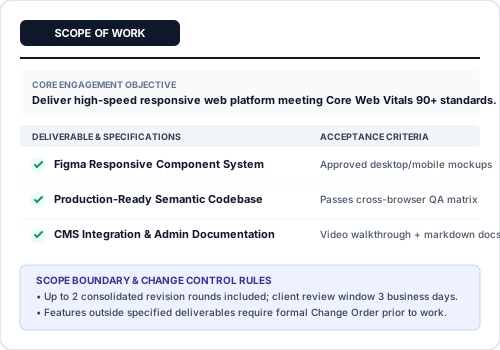
Scope of Work Document Preview

Scope of Work Builder

✨ AI Prompt Assistant Works with ChatGPT • Gemini • Claude

Scope of Work (SOW) & Boundaries AI Prompt

Generate explicit deliverables, client responsibilities, and strict out-of-scope exclusions in ChatGPT or Gemini.

How to use: 1. Click Copy AI Prompt ➔ 2. Paste into ChatGPT/Gemini ➔ 3. Just enter [Category], [Service/Role], & [Client Country] ➔ 4. Paste generated values into the highlighted fields below in exact order.
Act as a senior freelance project manager for [Your Service: e.g. WordPress & SEO Development]. I need to draft a binding Scope of Work (SOW) for "[Project Title: e.g. Corporate Portal Launch]" for client [Client Name].

Generate the following precise sections:
1. Project Objective: 2 sentences defining the exact business goal and final deliverable outcome.
2. 3 Core Deliverables: For each deliverable provide:
   - Deliverable Title
   - Concrete Scope Description (what is included)
   - Estimated Completion Date / Milestone trigger
3. Freelancer Responsibilities: 3 bullet points detailing technical tasks and handoffs.
4. Client Responsibilities: 3 bullet points detailing required assets, credentials, and approval turnaround (e.g. 3 business days).
5. Out-of-Scope Exclusions: 4 strict exclusions that will NOT be included for free (e.g. third-party API fees, content copywriting, unapproved revisions).
6. Change Order Process: 1 clear sentence on how new scope additions will be billed.

Format cleanly with short paragraphs ready to paste into each SOW field.
Corresponding Form Fields: (Click any step to scroll & highlight directly)

1. Parties & Overview

2. Deliverables & Acceptance Criteria

3. Roles & Explicit Responsibilities

4. Revision Rules & Change Orders

5. Data Backup

Live Scope of Work Preview
Connected Tools

The Definitive Guide to Scope of Work (SOW): Eliminating Scope Creep in Freelance Projects

Scope creep is universally recognized as the number one threat to freelance profitability and client satisfaction. It rarely begins with an outright disagreement—it starts innocently with requests for "just one small extra button", an additional revision cycle, or a slight tweak to an unstated specification. Without an agreed, legally binding Scope of Work, independent contractors have no objective contractual standard to differentiate between included deliverables and unpaid extra labor. Using our specialized scope of work generator, you can construct airtight, professional project boundaries in minutes.

⚡ What is a Scope of Work (SOW) Generator? (AIO Snippet)

A scope of work generator (or sow generator) is an operational document creation tool that allows freelancers and independent consultants to define project deliverables, technical acceptance criteria, phase timelines, client responsibilities, and out-of-scope boundaries. By specifying exactly what is and is not included in the project, it establishes an objective legal baseline that prevents scope creep and governs change orders, with free instant export to vector PDF and editable Microsoft Word (.docx).

Vague SOW vs. Bulletproof SOW: The Acceptance Criteria Standard

The difference between getting paid on time and enduring weeks of unpaid revisions lies in how your deliverables and acceptance criteria are written:

Deliverable Component Vague SOW (Invites Scope Creep) Bulletproof SOW (Guarantees Sign-Off)
Deliverable Definition "Design modern homepage and contact forms." "Figma desktop (1440px) and mobile (390px) responsive mockups for 1 homepage and 1 standard 4-field contact form."
Acceptance Criteria "Client must be satisfied with look and feel." "Written sign-off via email within 5 business days of delivery; failure to respond constitutes deemed acceptance."
Revision Limits "Unlimited revisions until happy." "Maximum 2 rounds of minor visual adjustments per phase. Structural redesigns require a formal Change Order."
Client Responsibilities "Client provides content when ready." "Client provides final approved copy and vector assets by Day 5; delays adjust final delivery date accordingly."
Exclusions Boundary Not specified. "Explicitly excludes server hosting fees, copywriting, third-party API costs, and post-launch maintenance."

How to Write a Scope of Work to Stop Scope Creep (5 Essential Clauses)

If you want to know how to write a scope of work to stop scope creep permanently, every contract you issue must incorporate these five structural pillars:

  1. Itemized Phase Deliverables: Break the overall project into sequential chronological milestones (e.g. Discovery → UI Design → Frontend Build → Deployment). Each deliverable must have an explicit technical format and quantitative output.
  2. Objective Acceptance Verification: Tie milestone completion to concrete verification standards rather than emotional approval. Include a 'deemed acceptance' clause (typically 3 to 5 business days) preventing clients from stalling project progress by ignoring reviews.
  3. Explicit Out-of-Scope Exclusions: Dedicated exclusion clauses protect you from unstated assumptions. If copywriting, translation, server setup, or custom animation is not included, state so explicitly.
  4. Client Dependency & Prerequisite Schedule: Freelance deadlines depend on client inputs. Specify that client delays in providing brand assets, credentials, or review feedback automatically extend delivery deadlines without penalty.
  5. Formal Change Order Protocol: State clearly that any request outside the documented SOW requires a formal written Change Order with an independent cost estimate and adjusted timeline, calculated via the Revision Charge Calculator.
Worked SOW Milestone Example: Mobile Application UI Design

Here is how an airtight SOW milestone phase is documented inside this builder:

  • Phase Name: Phase 2: Core User Experience Wireframes
  • Deliverable Items: 8 low-fidelity wireframe screens (iOS viewport 390x844) delivered via clickable Figma prototype link.
  • Acceptance Criteria: User navigation flows between onboarding, profile setup, and checkout validated; signed off in writing within 4 business days.
  • Revision Allocation: Up to 2 rounds of structural adjustments to screen layouts within 5 business days of delivery.
  • Explicit Exclusions: High-fidelity visual styling, color palette selection, copywriting, custom icon illustration, and React Native frontend coding.

Frequently Asked Questions (FAQs)

What is a Scope of Work (SOW) and why is it essential for freelance contracts?
A Scope of Work (SOW) is a binding operational contract agreement that outlines the specific tasks, deliverables, milestone timelines, and technical standards of a project. It establishes an objective legal baseline that prevents scope creep, sets client expectations, and defines when an assignment is formally complete.
How do I write a Scope of Work to stop scope creep effectively?
To prevent scope creep: 1) Replace subjective descriptions with measurable acceptance criteria, 2) Include a dedicated 'Out-of-Scope Exclusions' section listing items not covered in the fee, 3) Establish a formal Change Order procedure with hourly or fixed rates for new requests, 4) Define client review turnaround deadlines, and 5) Cap included revision rounds.
What are concrete acceptance criteria in a freelance SOW?
Acceptance criteria are measurable conditions that a deliverable must satisfy before the client signs off and milestone payments are released. Instead of 'create an intuitive app', concrete criteria state 'iOS and Android React Native build passing automated unit tests, responsive on screens from 375px to 430px, approved in writing within 5 business days'.
What should be included in the out-of-scope exclusions section of an SOW?
List items clients often assume are free additions, such as: server infrastructure hosting fees, paid stock photography licensing, copywriting or translation, ongoing maintenance after deployment, third-party API subscription costs, and new feature requests outside the original specification.
What is a Change Order protocol and how does it protect freelance profitability?
A Change Order protocol is a contractual clause stating that any request outside the agreed SOW requires a written amendment with an independent price estimate and revised delivery deadline. This prevents clients from pressuring you into unpaid scope additions.
How is a Scope of Work (SOW) different from a freelance quotation or contract?
A quotation specifies financial terms, line item costs, and expiration dates. A master contract governs legal liabilities, governing law, and indemnification. An SOW is the operational schedule attached to the contract that details exactly what work will be performed and verified.
Can I download my Scope of Work document as an editable Microsoft Word (.docx) file?
Yes. A2ZToolHub generates both vector-quality PDFs for immediate digital signature and fully editable Microsoft Word (.docx) files so you can easily modify legal clauses or insert corporate branding.
What client prerequisites should be listed in an SOW before project kickoff?
Specify all dependencies required from the client, such as: brand vector logos, server credentials, DNS access, copy approval sign-offs, and third-party API keys, stating that project deadlines adjust automatically if client materials are delayed.
How many revision rounds should be specified in an SOW deliverable schedule?
Standard freelance SOW agreements include 2 rounds of minor revisions per phase. Revisions apply to fine-tuning agreed mockups, whereas structural redesigns or new functional modules require a formal Change Order.
Can I transfer my finalized SOW deliverables into a payment milestone agreement?
Yes! Clicking 'Open in Payment Terms' in the preview panel automatically transfers project deliverables and milestone names into the Freelance Payment Terms Generator to structure upfront deposits and milestone release schedules.